It’s not the same, it has the same SOC, AllWinner H616 and same RAM/eMMC but the mainboard is entirely different.
Zero:
SV08:
It’s not the same, it has the same SOC, AllWinner H616 and same RAM/eMMC but the mainboard is entirely different.
Zero:
SV08:
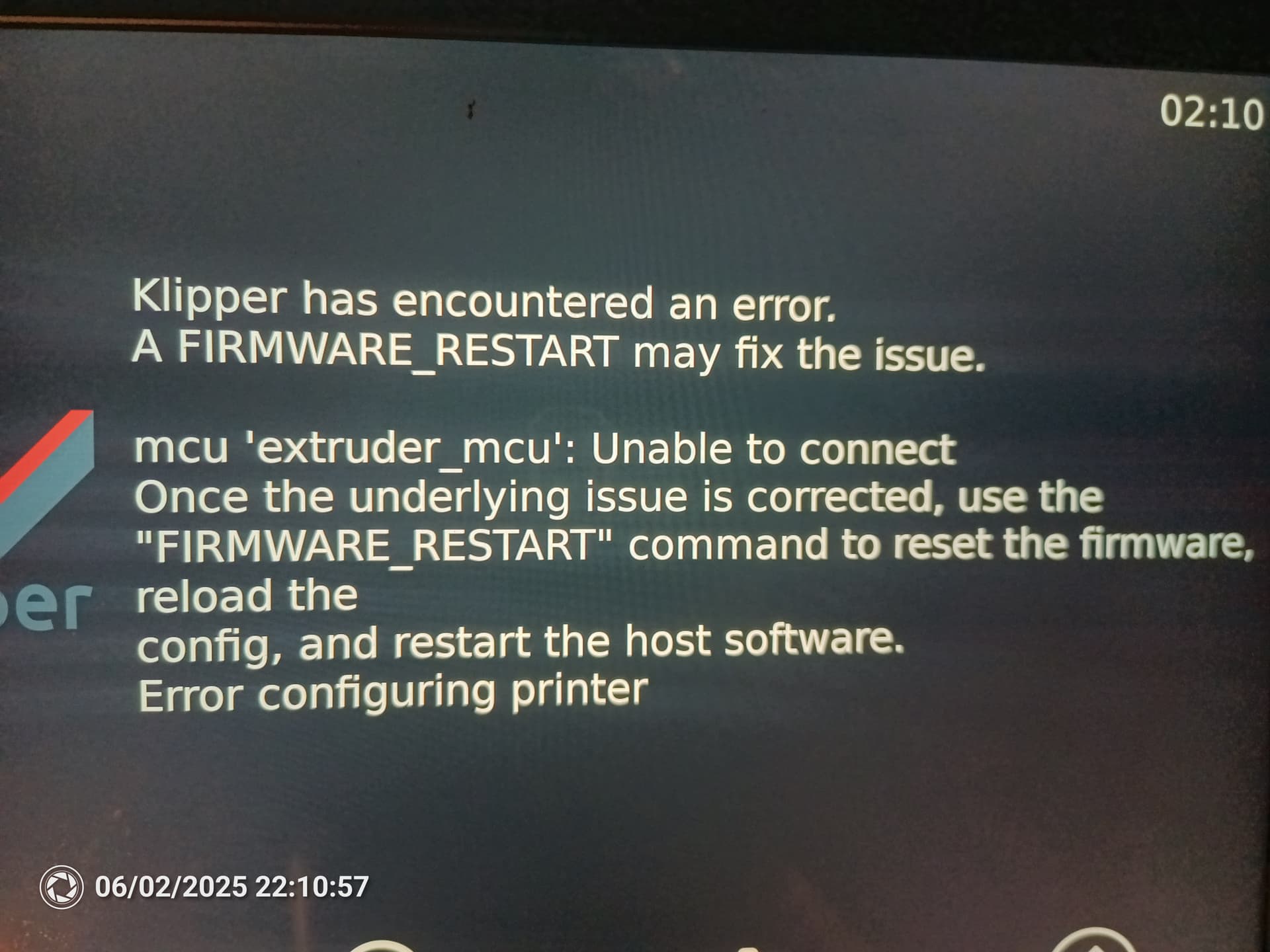
If you can’t get network to it then connect a HDMI monitor to see whats going on, it should automatically start KlipperScreen which should show an error on the monitor if Klipper fails to start. It’s usually broken config, if you powered it off then its likely the saved_variables.cfg file is corrupt or missing, you can get a fresh copy from Sovols github:
You are correct. I saw the part description in the step files (from github). It starts with SV08 and a quick look at the ports that are available from the outside and I assumed they’d carried it forward.
Looks like the same microcontroller but lots of pin changes to support the layout change and 3 less Z motors.
It probably gets even better, after you go to www.comgrow.com:
I must say, this triangle Sovol Comgrow Creality got me confused.
ive tried this, and its still dead.
i thought it was a fluke but the last time the lonely file on the drive had disappeared. it has now again disappeared. so essentially after attempting to get it to update the firware, its wiping the drive. im going to try it again but with an extra file on the drive incase it being by itself is causing an issue.
The .deb file will delete itself from the drive.
I noticed the same thing when I was testing my Wi-Fi last month.
Sovol had me re-flash my Zero.
A couple thoughts.
HDMI screen (even a TV) will show what is going on as Linux starts up.
In most cases the Linux side will boot from USB if there isn’t an OS on the EMMC (or it is removed). Download the full image (not the update) and etch it onto a USB drive. Pull the EMMC and plug in the USB.
Printer will be functional (but slow) while you wait for Sovol to ship a EMMC and/or Dongle.
With a HDMI screen and a USB keyboard some people report that holding down the spacebar during boot will stop the bootloader and allow you to specify USB boot. Then you can copy the USB to the EMMC in place. If you’re interested I’ll see if I can find the terminal commands to make it happen
Found a screen, none touch lying around.
At initial boot, this error pops up.
It then tries to boot klipper and this error pops up.
I tried a USB mouse I have to navigate but it doesn’t work. Only keyboard I have is PS2. I’d buy a cheap keyboard from Amazon to navigate but i need to know it will work for this.
ssh over serial. Try each USB on the mainboard plug until PC shows a USB to serial converter (built into mainboard). Note the port ID and launch Putty
User sovol
Password sovol
Either you hit e-stop before the USBid got written into printer.cfg or (most likely) halfway through flashing the toolhead MCU.
Once your in via navigate to ~/home/sovol/printer_data/build and find the precompiled toolhead firmware and a script that should flash it
I went ahead and purchased a small keyboard/mouse and a 5in BTT klipper touchscreen. Of I remove the screen with the stop button I won’t ever hit it again. I plan on putting a slab of concrete/countertop under the printer so I’ll figure out a way to get the screen to fit permanently later.
You are better off getting network (preferably ethernet rather than wifi) working on it so you can use the web interface and/or use ssh to connect to the printer. Unable to connect to extruder mcu means its having problems connecting to the microcontroller on the toolhead board, could be a loose cable or bad ground, could also be a dead toolhead board, could also be CAN problems, but its hard to diagnose without the web interface and ssh.
The HDMI touch screen “connects” to Klipper on the Linux side. Klipperscreen is essentially a web client communicating VIA Moonraker so that’s covered. Sovol’s stock touchscreen connects to the MCU and is non functional until Klipper is up and running. I don’t understand why Sovol let that happen in 2025.
But YES get it on the network as SSH is the best tool to get at the OS and untangle things.
They also ship the Zero’s firmware with the KlipperScreen service in a constant crash loop if there’s no HDMI connected. 
I get the feeling Sovol outsources their software development to Makerbase. Look in all the custom Python modules and you’ll find “Copyright MKS”. But that half assed crippled down screen was a Hardware choice…
I’d wish they’d actually keep their software in an updated and organized github repo instead of just syncing some outdated content there once per new printer release. That way it would at least be possible to create pull requests for fixes they don’t appear to care doing themselves. However, maybe the problem is that such solution would as a side effect give us some traceability on what they are changing and possibly even why. But instead, we are stuck of having to just point out these issues in random forum posts… on their own forum.
the only thing i have that might let me connect is a (no internet connection) wifi router. i have it connected to the windows PC and then the Printer via ethernet. i can access the router via browser but i have no idea what to do from here to get into the printer
In the routers web interface there will be a page with a list of connected devices. When you plug in the printer it will show up on that list along with the IP address the router assigned to it. I’ve no idea what the Zero will announce for it’s “friendly name”.
Once you get the IP put that in the browser and bingo Mainsail. Add a :81 to the address and it should connect to Fluidd.
Or SSH to that IP
It’s a Klipper limitation, the “boot” screen is just a hard coded static image in the MCU firmware, the LCD is driven by Klipper itself so if Klipper never starts then the LCD remains inactive, a bit off topic but I was able to change it when messing around with my SV08 by compiling a custom logo into the mainline firmware.