Does the board have a pin/connection to give out a beep (eg when Print is completed)?
Hello,
It is not necessary to wire a pin to get an alarm.
You can use software such as “Octoapp for klipper” on your smartphone, which sends you an alarm when printing is complete.
No, there does not appear to be any beeper/buzzer/speaker stock on the Zero. No UI clicks from either the stock screen or the official SV08/Zero HDMI Capacitive Klipper Screen. I can’t find any evidence of it in printer.cfg either. Perhaps one of the 3rd party screens has a speaker??
I’d also like a simple beeper functionality (aka Marlin M300 type behavior), and there are general Klipper macros and examples out there, but nothing Zero specific. There’s gotta be one unused pin SOVOL-ZERO/Motherboard/Mcu_Pin_definition.pdf at main · Sovol3d/SOVOL-ZERO · GitHub
I asked about this for my ACE when I got it…first Klipper printer.
Now I have 2 Klipper printers & to me anyway, it seems to be a Klipper thing.
Marlin boards had a speaker, but Klipper boards don’t.
Just sharing, short answer, no beeps… 
I noticed a piezoelectric buzzer on the store front Sovol Zero original screen picture.
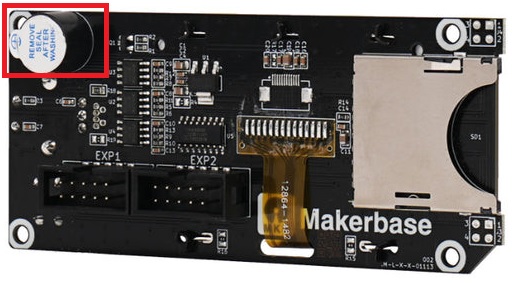
Ref: Sovol Zero/SV08 3D Printer Original Screen
Question marks abound… I opened my Sovol Zero original screen…
and found this

So taking one for the team and being from a era where sometimes it just needs “a” part I tried this… Amazon.com: SoundOriginal PC Motherboard Internal Speaker BIOS Alarm Buzzer (3pcs/Pack) : Electronics with some breadboard jumper wires.
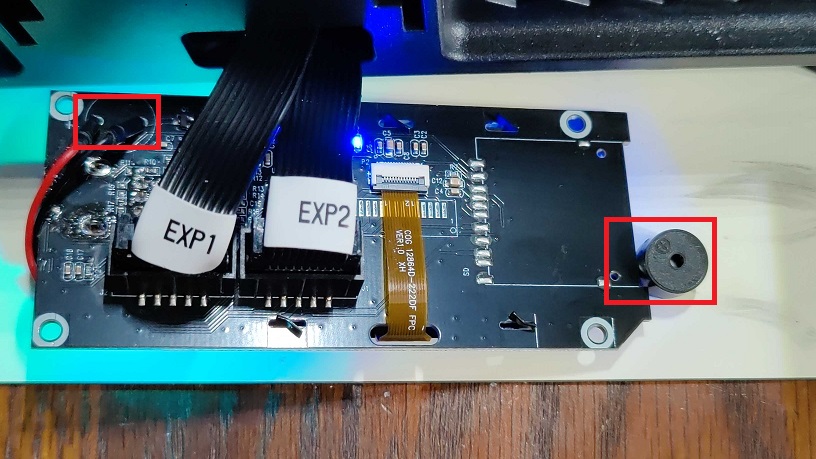
Sad to report no joy, silent as the night… Tested knob push, turn left/right, push and home the printer. As mentioned, probably need more somewhere…
Good news, in the end my screen still works and my printer still prints : Attempted HW hack completed…
I found similar LCD boards around the internet, but if the Zero is going to beep it’s going to take some work at multiple levels by folks with more skill in this area than I have.
Cheers,
-Mike
I’m interested if someone finds an easy fix. When desiring notification I set a countdown alarm on my phone using the estimated time. Being able to open Mainsail and see estimated time remaining and the camera from my phone’s browser helps too. I have the printer on a smart socket and I can set it to turn off based on the estimated time plus some margin. The printer beeping might sometimes save a bit of effort to set a timer when I remain close enough to hear it but it is low priority on my list of potential refinements.
I suggest you take my first message into account.
My printer is also plugged into a connected wall outlet, and when I receive the actual message (not approximate) from Octoapp saying “printing complete,” I can turn off the printer.
Klipper can turn off many wifi smart switches automatically.
If yours is not on the list Klipper can interface with an open source Home Assistant server.
Home Assistant works with nearly every “smart” platform. Another advantage of Home assistant is Klipper can call the shutoff routine that has a delay THEN shutdown the host OS before the power gets cut 20 seconds later. The downside is you need a server to run Home Assistant.
I personally haven’t gotten this, as I already have the official Sovol screen, but if anybody wants to try this one has a 3.5mm jack and possibly a built-in speaker Amazon.com: BIGTREETECH HDMI5 V1.2 Touchscreen Monitor 5 inch IPS LCD Display 800×480 for Raspberry-Pi 4B/3B, BTT Pi V1.2/Pi 2 Compatible with SKR Mini E3 V3.0/Octopus/Manta M4P/M5P SKR 3 to Running Klipper : Industrial & Scientific . is much cheaper than Sovol’s ($45 vs $70).
There’s also a mount, which doesn’t even require the extension feet that some others do: Sovol Zero Mount BTT HDMI 5 V1.2 by MzTechnology97 | Download free STL model | Printables.com
While the board omitted the beeper, the FET to drive it is still there, and it is controlled through EXP1_1 (aka PA8). So I soldered a passive buzzer like @MikeHides did and got it to work!
The CYT1008 (10mm) I picked out is just a touch small, I had to bend the pins outward slightly to get it to fit. A 12mm would work better.
Add the following added to your config so you can use Marlin-style M300 tones:
[pwm_cycle_time _beeper]
pin: EXP1_1 # PA8 on the Sovol Zero
cycle_time: 0.001 # 0.001 (1 kHz) default (not pitch perfect)
value: 0
shutdown_value: 0
scale: 1

[gcode_macro M300]
gcode:
    {% set S = params.S|default(1000)|int %} # Use a default 1kHz tone if S is omitted, 5kHz is about the max
    {% set P = params.P|default(100)|int %}  # Use a 100ms duration is P is omitted.
    {% if S > 0 %}
        {% set c = 1.0 / S %}
        SET_PIN PIN=_beeper VALUE=0.3 CYCLE_TIME={c}  # VALUE is volume (needs to be between 0.2 & 0.8 or so )
    {% endif %}
    G4 P{P}
    SET_PIN PIN=_beeper VALUE=0
Nice, thank you much for posting the details @rpcyan !!
Cheers,
-Mike
Thanks to @rpcyan for figuring out the hardware/software side of the connection.
After a day of testing and playing around with tones and frequencies I am now alerted after a print.
Buzzer installed:

I’ve never written a macro before, lots of examples around, used some AI to understand what I was looking at. Took some of those answers, figured out what I needed to get the old style digital phone ring. Could it be done better probably, did I cheat, maybe. I try to use AI like a book  to explain and provide examples for understanding the parts I don’t so I can get what I want done.
So like cooking something from a recipe I copied some things, added other things, baked it with format and testing.. and well it worked! Best of all nothing blew up
I included some parameters that can override the defaults so the ring “sound/style” can be changed. Comments have examples on using them NOTE: V = 0.5 is loud pretty loud. To test the macro open the console and paste the examples in without the comments i.e. “RINGME HI=1200 LO=800”.
Steps:
- In Macro.cfg Added RINGME to end of the END_PRINT macro.
- In Macro.cfg at the end of the file I included @rpcyan’s pwm_cycle_time setup for the _beeper object and my macro RINGME
RINGME macro: (Cringe worthy for developers I’m sure  )
)
[pwm_cycle_time _beeper]
pin: EXP1_1 # PA8 on the Sovol Zero
cycle_time: 0.001 # 0.001 (1 kHz) default (not pitch perfect)
value: 0
shutdown_value: 0
scale: 1

# RINGME V3.1 - Simple 2-tone annoying "phone ring” (alternates HI/LO)
#
# RINGME Macro uses "PIN=_beeper" This object must exist, e.g. [pwm_cycle_time _beeper]).
# v3.1 Fixed a issue with leaving the beeper on.
#
# Quick use examples:
#   RINGME                          ; defaults (3s)
#   RINGME P=6000                   ; total duration (ms)
#   RINGME HI=1200 LO=800           ; pitch (Hz)
#   RINGME STEP=60                  ; switch speed (ms), min 20
#   RINGME V=0.3                    ; volume (0..1)
#
[gcode_macro RINGME]
gcode:
    {% set P    = params.P|default(3000)|int %}   # total duration (ms)
    {% set HI   = params.HI|default(950)|int %}   # high tone (Hz)
    {% set LO   = params.LO|default(650)|int %}   # low tone (Hz)
    {% set STEP = params.STEP|default(120)|int %} # how often to switch (ms)
    {% set V    = params.V|default(0.5)|float %}  # volume (0.2..0.8 typical)

    {% if STEP < 20 %}{% set STEP = 20 %}{% endif %}
    {% if V < 0.0 %}{% set V = 0.0 %}{% endif %}
    {% if V > 1.0 %}{% set V = 1.0 %}{% endif %}

    {% set steps = (P / STEP)|int %}
    {% if steps < 1 %}{% set steps = 1 %}{% endif %}

    {% for i in range(steps) %}
        {% set freq = (HI if (i % 2) == 0 else LO) %}
        {% if freq > 0 %}
            {% set c = 1.0 / freq %}
            SET_PIN PIN=_beeper VALUE={V} CYCLE_TIME={c}
        {% else %}
            # freq <= 0 means "silent"
            SET_PIN PIN=_beeper VALUE=0
        {% endif %}
        G4 P{STEP}
    {% endfor %}
    # Fail safe, if something breaks with macro, ensure the beeper is off!
    SET_PIN PIN=_beeper VALUE=0
One last note: I went down the rabbits hole with this today, I started building a musical macro where I can play tunes like old video games just by calling the macro and the tune name MUSICTUNE MODE=ENDGAME etc.. The buzzer plays only a single frequency at a time but alternating spacing and duration you can get some very fun recognizable tunes for alerts.
Cheers,
-Mike
Now that I’ve tried to play some converted melodies I’ve realized I wasn’t handling S0 correctly. This is essentially a delay between notes, but evidently melodies sill use M300 P300 S0 instead of a more direct G4 P300.
Silence was instead being turned into 1kHz. Whoops!
Edited my post above
Thank you for posting back @rpcyan
I’ve updated my RINGME macro example as well. I completely missed that, not fully understanding the pwm functionality, appreciated.
Cheers,
-Mike