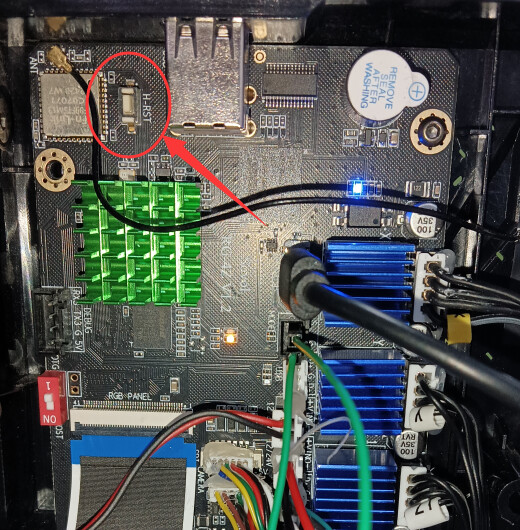
I tried to flash the firmware with the guide provided by Sovol: SV06 ACE image flashing tutorial but I fail to connect the printer to my PC. RKDevTool shows “No Devices found” in the bottom left corner whatever I do. I tried forcing the printer into “MASKROM“ Mode by shorting the connection (as described in the tutorial), 3 different USB cables, 2 different PCs, different USB ports, I even installed newer versions of the driver but I cannot get to the point where RKDevTool recognizes my printer. I don’t know what to do anymore.
To the reason why I want to flash my firmware: I updated Klipper via the Mainsail update tool before I read multiple postings here on the forum that this is a bad idea, which it is. Klipper failed on startup which I could solve by commenting the sensor out (the part where the Sovol-Klipper differs form the standard version). But I am not confident to print with this hacky solution and here I am trying to reset everything by flashing the firmare - which does not work as well … Frustrating.
I am thankful for every piece of advice. Thanks in advance!
Unfortunately this issue is 2 levels below “Klipper”
Establishing a connection between a RKtools on a Windows PC to the RockChip processor on an external board is not something I have any experience with.
I would start with the driver included with the RKtools. Go to device manager and click [View/show hidden devices] then expand the [ports] and [USB devices] lists. Uninstall/remove driver for EVERY device with a greyed out icon.
It is fairly common for Windows to try to “match” an already installed driver to an oddball device. By removing “hidden” device drivers the chances are better that the correct match is made.
Get a support ticket open with Sovol ASAP if this doesn’t get you in.
Thank you for your quick Responses!
Yes, i did Press the Hardware reset button. I am pretty sure that I got it in the described Boot Mode because after jumping the Connection and pressing the Button, the indicator led on the Board went from flashing to permanently on and the printer screen stayed black. After another reboot it came back normally. I tried this several times.
I will try to fix the Driver as described, thanks for the advice, and will report and open a ticket if this does not work.
Thank you!
So I Spend my entire evening again trying to flash the Firmware but with no success. My PC still cant find the Printer and the RK Developer Tool says No Device found. I tried everything now Including a third PC, 5 different USB cables, different driver Versions, multiple reboots, deleting old USB devices with the suggested Tool… I could See that the Driver was installed through a Power shell comand but the printer did Not Show Up at any USB Device Manager including the Windows one. Not even as unknown or unused Device. Even the USB Tool Said that the USB Port hast ho Connection. I am at a Point where I think that the USB connector on the printer board must be faulty. @sovol3d I messaged you as you asked.
Thanks again for the tipps and hints.
Greetings Jens
So after contacting the support they where very helpful and send me a new motherboard. I switched it out and my printer is printing again. Unfortunately, I haven’t been able to repair the old motherboard. Thanks again for everyones help!
Greetings Jens
I just helped someone with this today. There is a red switch on the board, listed with NO (or ON) and 1. Printed on the board, switching it to 1, will enable OTG mode.
After OTG mode is enabled, then the flashing will work.