Hi everyone, had my ACE for a while now, on the whole I use PLA (Jato matte), all calibration dialed in (or so I thought!) and put fuzzy on (0.1/0.1). Nozzle is a TriangleLabs NCB 0.4mm. I use Ocraslicer
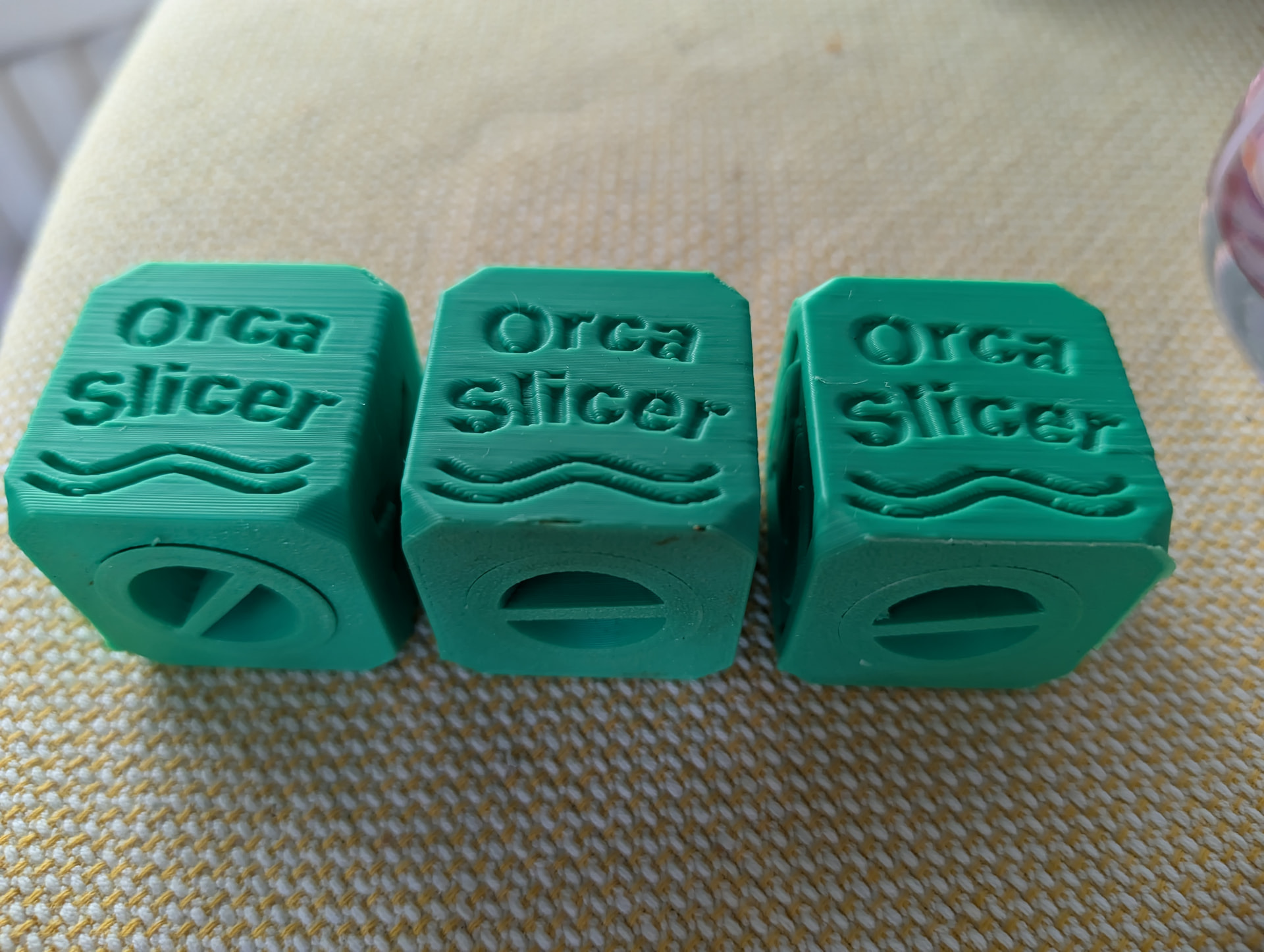
Last night, I thought I’d print off the Ocraslicer cube, see how it turns out, and can see a fair few layer lines. I usually print off in 0.2 for functional, and 0.12 for organic. I use inner/outer/inner, and speed is 200 for outer, 270 inner. 2 walls. 210 for pla, 55 for baseplate
On the left is Arachne with adaptive lines, middle is 0.2mm, and right is 0.18mm. To me, the 0.2mm has best quality, but, under light, the layer lines are horrific!
Am I starting to push the limit of the machine expecting a better print from something like this? I’ve halved acceleration, outer wall speed, highered pla temperature, with the same results
I’m finding .20 height with fuzzy is the only real solution at the moment, but can’t really use that on huge prints! I’ve watched all the videos on your previous post, and am planning on looking at the extruder gear, I’ve been messing around with the tension arm, and had a little success with that, next step is to open it up and look at the main gear, if it’s mechanical monkey brain might find a solution(!)
I was half temped with the bambu a1 with ams or this sovol model, a (growing) part of me wishes I went for the other one
An update @Lion ,the fan in the processor cage thing died (3/4 way through a print, as expected..) swapped for a Noctua NF-A4x10 FLX. Took my extruder apart, lots of old filament pieces in there, cleaned all that out, re-greased. looks great. Checked gears, all level. Re-calibrated belts through numerous test models, got them spot on. Checked Z bars are level and straight.
Spent several hours going through the test model, modifying flows, layer time, cooling, heights and so on. Gone through one spool of pla for tests.
Frustrating isn’t it.
There is a lot in my post above that wasn’t posted because I was dealing with Sovol directly.
I also replaced both Steppers & Cuplers along with new Z-Rods…I even added Oldham Couplings.
It has to be something built into the machine…gear ratio..I don’t know.
I’m glad you mentioned the Oldham Couplings, that was my next route! I watched every video you previous posted, there’s some really great content, this has to be a mechanical issue somewhere? I’ve messed with the Z offset mid-print each step down to -0.05 and up +0.05 every 20 layers to see what happens there, makes no difference. I can’t believe this can’t be fixed (more fool me!)
I did see one video of someone mentioning using a 0.2mm nozzle and print slowly (under 20mm/s), but that’s just ridiculous. Also saw something about slowing layer speed, can’t find much how to adjust that in ocra in the cooling section, that part is gobbledygook to me. Someone on reddit took their printer apart and played with the Z screws, bars, and also re-greased their couplings that seemed to fix their issue (sv06)
The upside is, i’m learning about the printer more, the downside, I’m already looking at possible replacement printers
The band appears every 3 mm, the space between the Z-rods is 1.5mm…so 1 full rotation would equal 3mm. I got stuck on that for awhile, but I did everything I could think of.
Also, this was my first Klipper printer, so I still don’t know for sure if it’s a Klipper issue or a Orca Profile issue.
I did try to modify a Gcode from Cura off the SV06 for the ACE…but the nozzle hit the bed..so that didn’t go anywhere.
So as much as I didn’t want to, I kinda gave up hoping someone else might figure it out…and they gave up too
So, now it’s your turn…I’ll try to help if I can…so keep posting.
Well this evening I’ve stripped the two screw bars, cleaned and checked they are both clean and level (back of frame to bar is 50.4mm), using some decent digital calipers, they’re all aligned now (I was out by 2mm)
Did that make any difference?
A little…
My test is a 30mm cube, no infill, 0.2mm, 2 walls
Every layer is ever so slightly out compared to the previous, I’m wondering if this is vibration?
Checking my initial prints, I never had this at all, which makes me think something is loose, or… too tight!
Some good news, those little black things that fit on the z axis on each screw? I’ve loosened them completely so there is a fair bit of play, the prints have improved
@lion I’ve ordered WobbleX, with both coupler types (ali order, was buying bits and bobs anyway), in the meantime I’ve been playing with some settings, and have managed to get quite a bit of banding removed (or significantly minimised) on the 0.12 height. Going to carry on fiddling over the next few days.
Can you tell me, are you on an original nozzle and have you done anything to your baseplate? I’ve put springs under mine to help with levelling
No, this is the 1st printer I left stock, I wanted to fix the banding first.
The only thing that is different is the Oldham Coupling…I used this print from the SV06 for the spacer gap.